"/><stop offset="1" stop-color="rgb(59, 105, 122)"/></linearGradient></defs><g d="M 46.475 15.614 L 46.475 5.299 L 50.461 5.299 L 50.461 15.748 C 50.461 17.307 51.271 18.354 53.231 18.354 C 55.078 18.354 55.956 17.24 55.956 15.681 L 55.956 5.299 L 59.942 5.299 L 59.942 15.614 C 59.942 19.29 57.713 21.517 53.231 21.517 C 48.749 21.517 46.475 19.335 46.475 15.614 Z M 61.812 9.822 L 65.347 9.822 L 65.347 11.381 L 65.415 11.381 C 66.271 10.155 67.375 9.487 68.974 9.487 C 71.496 9.487 72.982 11.27 72.982 13.809 L 72.982 21.227 L 69.311 21.227 L 69.311 14.544 C 69.311 13.341 68.703 12.517 67.509 12.517 C 66.315 12.517 65.481 13.519 65.481 14.922 L 65.481 21.227 L 61.81 21.227 L 61.81 9.821 Z M 74.648 5.299 L 78.32 5.299 L 78.32 8.241 L 74.648 8.241 Z M 74.648 9.822 L 78.32 9.822 L 78.32 21.229 L 74.648 21.229 Z M 79.13 9.822 L 82.914 9.822 L 84.491 14.968 C 84.829 16.105 85.121 17.262 85.121 17.262 L 85.166 17.262 C 85.166 17.262 85.459 16.103 85.796 14.968 L 87.395 9.822 L 91.066 9.822 L 87.081 21.229 L 83.116 21.229 Z M 90.91 15.504 C 90.91 12.095 93.319 9.489 96.833 9.489 C 98.477 9.489 99.784 10.023 100.775 10.914 C 102.148 12.162 102.825 14.144 102.802 16.462 L 94.513 16.462 C 94.739 17.999 95.595 18.957 97.103 18.957 C 98.072 18.957 98.702 18.533 99.018 17.82 L 102.599 17.82 C 102.351 18.845 101.676 19.826 100.662 20.516 C 99.693 21.184 98.522 21.563 97.058 21.563 C 93.252 21.563 90.91 18.957 90.91 15.504 Z M 99.086 14.3 C 98.95 12.942 98.094 12.073 96.9 12.073 C 95.505 12.073 94.783 12.942 94.536 14.3 Z M 104.04 9.822 L 107.553 9.822 L 107.553 11.604 L 107.621 11.604 C 108.432 10.246 109.378 9.644 110.773 9.644 C 111.112 9.644 111.336 9.666 111.494 9.733 L 111.494 12.851 L 111.404 12.851 C 109.152 12.539 107.71 13.631 107.71 16.103 L 107.71 21.227 L 104.039 21.227 L 104.039 9.821 Z M 111.968 17.53 L 115.436 17.53 C 115.571 18.667 116.337 19.223 117.554 19.223 C 118.657 19.223 119.355 18.821 119.355 18.087 C 119.355 17.061 117.96 16.95 116.427 16.684 C 114.422 16.349 112.283 15.815 112.283 13.141 C 112.283 10.736 114.535 9.487 117.26 9.487 C 120.526 9.487 122.282 10.89 122.463 13.141 L 119.085 13.141 C 118.949 12.116 118.251 11.805 117.238 11.805 C 116.337 11.805 115.639 12.14 115.639 12.853 C 115.639 13.654 116.944 13.766 118.409 14.034 C 120.437 14.369 122.824 14.88 122.824 17.799 C 122.824 20.294 120.595 21.587 117.576 21.587 C 114.198 21.587 112.08 20.05 111.968 17.533 Z M 123.589 18.043 C 123.589 15.526 125.617 14.769 128.003 14.456 C 130.165 14.189 130.932 13.967 130.932 13.187 C 130.932 12.452 130.459 11.961 129.356 11.961 C 128.184 11.961 127.599 12.473 127.486 13.431 L 124.108 13.431 C 124.198 11.314 125.842 9.511 129.333 9.511 C 131.067 9.511 132.239 9.824 133.072 10.447 C 134.063 11.16 134.535 12.274 134.535 13.699 L 134.535 19.446 C 134.535 20.36 134.626 20.872 134.941 21.072 L 134.941 21.229 L 131.383 21.229 C 131.202 20.983 131.09 20.538 130.999 19.958 L 130.954 19.958 C 130.279 20.916 129.265 21.517 127.531 21.517 C 125.234 21.517 123.589 20.291 123.589 18.042 Z M 131.021 17.152 L 131.021 15.794 C 130.548 16.039 129.872 16.218 129.129 16.395 C 127.71 16.707 127.124 17.063 127.124 17.932 C 127.124 18.845 127.799 19.202 128.7 19.202 C 130.073 19.202 131.019 18.378 131.019 17.152 Z M 136.336 5.299 L 140.052 5.299 L 140.052 21.229 L 136.336 21.229 Z M 45.821 34.518 L 49.829 34.518 C 50.01 36.121 51.068 36.789 52.982 36.789 C 54.288 36.789 55.571 36.322 55.571 35.119 C 55.571 33.848 54.264 33.582 52.058 33.046 C 49.265 32.401 46.316 31.554 46.316 28.211 C 46.316 24.868 49.109 23.311 52.712 23.311 C 56.316 23.311 58.906 24.87 59.064 28.211 L 55.167 28.211 C 55.009 26.985 54.063 26.295 52.577 26.295 C 51.181 26.295 50.258 26.896 50.258 27.787 C 50.258 28.902 51.497 29.168 53.906 29.703 C 56.902 30.394 59.605 31.307 59.605 34.716 C 59.605 38.124 56.722 39.906 53.005 39.906 C 48.727 39.906 45.911 38.035 45.821 34.515 Z M 61.046 40.466 L 62.308 40.466 C 63.389 40.466 63.816 40.042 63.816 39.262 C 63.816 38.772 63.591 38.103 63.118 36.901 L 59.718 28.123 L 63.592 28.123 L 65.146 32.979 C 65.507 34.094 65.866 35.608 65.866 35.608 L 65.911 35.608 C 65.911 35.608 66.227 34.094 66.587 32.979 L 68.095 28.123 L 71.767 28.123 L 67.781 39.686 C 66.857 42.359 65.754 43.295 63.434 43.295 L 61.047 43.295 L 61.047 40.466 Z M 71.767 35.831 L 75.235 35.831 C 75.37 36.968 76.136 37.524 77.353 37.524 C 78.456 37.524 79.154 37.123 79.154 36.388 C 79.154 35.363 77.759 35.251 76.226 34.985 C 74.221 34.65 72.082 34.116 72.082 31.442 C 72.082 29.037 74.334 27.789 77.059 27.789 C 80.325 27.789 82.081 29.192 82.262 31.442 L 78.884 31.442 C 78.748 30.417 78.05 30.106 77.037 30.106 C 76.136 30.106 75.438 30.441 75.438 31.154 C 75.438 31.956 76.745 32.067 78.208 32.335 C 80.236 32.67 82.623 33.182 82.623 36.1 C 82.623 38.595 80.394 39.888 77.375 39.888 C 73.997 39.888 71.879 38.351 71.767 35.834 Z M 84.379 36.523 L 84.379 30.397 L 82.848 30.397 L 82.848 28.125 L 84.379 28.125 L 84.379 24.516 L 87.96 24.516 L 87.96 28.125 L 90.055 28.125 L 90.055 30.397 L 87.96 30.397 L 87.96 35.743 C 87.96 36.635 88.455 36.858 89.245 36.858 C 89.561 36.858 89.92 36.835 90.055 36.835 L 90.055 39.487 C 89.74 39.576 89.042 39.665 88.051 39.665 C 85.91 39.665 84.379 38.975 84.379 36.524 Z M 90.753 33.805 C 90.753 30.397 93.163 27.79 96.676 27.79 C 98.32 27.79 99.627 28.324 100.618 29.215 C 101.991 30.464 102.668 32.445 102.646 34.763 L 94.357 34.763 C 94.583 36.3 95.438 37.258 96.947 37.258 C 97.915 37.258 98.546 36.834 98.861 36.121 L 102.443 36.121 C 102.194 37.146 101.519 38.127 100.505 38.817 C 99.537 39.485 98.365 39.864 96.902 39.864 C 93.095 39.864 90.753 37.258 90.753 33.805 Z M 98.928 32.601 C 98.792 31.243 97.937 30.374 96.742 30.374 C 95.347 30.374 94.625 31.243 94.378 32.601 Z M 103.883 28.123 L 107.397 28.123 L 107.397 29.749 L 107.464 29.749 C 108.185 28.568 109.289 27.789 110.955 27.789 C 112.464 27.789 113.613 28.568 114.198 29.794 L 114.243 29.794 C 115.144 28.413 116.383 27.789 117.869 27.789 C 120.482 27.789 121.787 29.549 121.787 32.111 L 121.787 39.53 L 118.116 39.53 L 118.116 32.758 C 118.116 31.532 117.599 30.819 116.495 30.819 C 115.323 30.819 114.67 31.777 114.67 33.136 L 114.67 39.53 L 110.999 39.53 L 110.999 32.758 C 110.999 31.532 110.482 30.819 109.378 30.819 C 108.274 30.819 107.553 31.777 107.553 33.136 L 107.553 39.53 L 103.882 39.53 L 103.882 28.123 Z M 122.756 35.831 L 126.224 35.831 C 126.36 36.968 127.125 37.524 128.342 37.524 C 129.446 37.524 130.144 37.123 130.144 36.388 C 130.144 35.363 128.748 35.251 127.215 34.985 C 125.211 34.65 123.072 34.116 123.072 31.442 C 123.072 29.037 125.323 27.789 128.049 27.789 C 131.314 27.789 133.071 29.192 133.251 31.442 L 129.873 31.442 C 129.738 30.417 129.04 30.106 128.026 30.106 C 127.125 30.106 126.427 30.441 126.427 31.154 C 126.427 31.956 127.733 32.067 129.198 32.335 C 131.225 32.67 133.612 33.182 133.612 36.1 C 133.612 38.595 131.383 39.888 128.364 39.888 C 124.986 39.888 122.869 38.351 122.756 35.834 Z M 19.858 20.834 C 14.347 17.656 12.099 14.66 12.099 10.494 C 12.099 6.786 15.15 3.768 18.899 3.768 C 29.32 3.768 37.797 12.154 37.797 22.461 C 37.797 29.221 34.151 35.153 28.704 38.436 C 29.237 37.166 29.51 35.804 29.509 34.428 C 29.509 28.8 26.623 24.733 19.858 20.832 Z M 17.939 24.09 C 11.175 20.19 8.289 16.124 8.289 10.494 C 8.289 9.076 8.575 7.722 9.094 6.486 C 3.646 9.771 0 15.703 0 22.463 C 0 32.77 8.478 41.156 18.898 41.156 C 22.647 41.156 25.698 38.138 25.698 34.43 C 25.698 30.264 23.45 27.268 17.939 24.09 M 19.171 44.921 C 19.08 44.921 18.99 44.924 18.898 44.924 C 18.99 44.924 19.081 44.924 19.171 44.921 Z M 18.624 0.003 C 18.716 0.003 18.806 0 18.898 0 C 18.806 0 18.715 0 18.624 0.003 Z M 19.858 20.835" fill="transparent" height="44.92397372352372px" id="Jup70EXZX" width="140.052203631137px"><path d="M 0.654 10.314 L 0.654 0 L 4.64 0 L 4.64 10.448 C 4.64 12.007 5.451 13.055 7.41 13.055 C 9.257 13.055 10.136 11.94 10.136 10.381 L 10.136 0 L 14.121 0 L 14.121 10.314 C 14.121 13.991 11.892 16.218 7.41 16.218 C 2.928 16.218 0.654 14.035 0.654 10.314 Z M 15.991 4.523 L 19.527 4.523 L 19.527 6.082 L 19.594 6.082 C 20.45 4.856 21.554 4.188 23.153 4.188 C 25.675 4.188 27.161 5.97 27.161 8.51 L 27.161 15.928 L 23.49 15.928 L 23.49 9.245 C 23.49 8.041 22.882 7.217 21.688 7.217 C 20.494 7.217 19.661 8.22 19.661 9.623 L 19.661 15.928 L 15.989 15.928 L 15.989 4.521 Z M 28.828 0 L 32.499 0 L 32.499 2.941 L 28.828 2.941 Z M 28.828 4.523 L 32.499 4.523 L 32.499 15.929 L 28.828 15.929 Z M 33.31 4.523 L 37.094 4.523 L 38.67 9.669 C 39.008 10.805 39.3 11.963 39.3 11.963 L 39.345 11.963 C 39.345 11.963 39.638 10.804 39.975 9.669 L 41.574 4.523 L 45.246 4.523 L 41.26 15.929 L 37.295 15.929 Z M 45.089 10.204 C 45.089 6.796 47.498 4.189 51.012 4.189 C 52.656 4.189 53.963 4.723 54.954 5.615 C 56.327 6.863 57.004 8.844 56.981 11.162 L 48.693 11.162 C 48.918 12.699 49.774 13.657 51.283 13.657 C 52.251 13.657 52.881 13.233 53.197 12.521 L 56.778 12.521 C 56.53 13.546 55.855 14.526 54.841 15.216 C 53.873 15.884 52.701 16.264 51.237 16.264 C 47.431 16.264 45.089 13.657 45.089 10.204 Z M 53.265 9.001 C 53.13 7.642 52.274 6.774 51.08 6.774 C 49.684 6.774 48.962 7.642 48.715 9.001 Z M 58.219 4.523 L 61.733 4.523 L 61.733 6.305 L 61.8 6.305 C 62.611 4.947 63.557 4.344 64.953 4.344 C 65.291 4.344 65.515 4.366 65.673 4.433 L 65.673 7.552 L 65.583 7.552 C 63.331 7.239 61.889 8.331 61.889 10.804 L 61.889 15.928 L 58.218 15.928 L 58.218 4.521 Z M 66.147 12.231 L 69.615 12.231 C 69.75 13.367 70.516 13.924 71.733 13.924 C 72.837 13.924 73.535 13.522 73.535 12.787 C 73.535 11.762 72.139 11.65 70.606 11.384 C 68.601 11.049 66.463 10.515 66.463 7.842 C 66.463 5.436 68.714 4.188 71.439 4.188 C 74.705 4.188 76.461 5.591 76.642 7.842 L 73.264 7.842 C 73.128 6.817 72.431 6.506 71.417 6.506 C 70.516 6.506 69.818 6.84 69.818 7.553 C 69.818 8.355 71.124 8.467 72.589 8.734 C 74.616 9.069 77.003 9.581 77.003 12.5 C 77.003 14.995 74.774 16.287 71.755 16.287 C 68.377 16.287 66.26 14.751 66.147 12.233 Z M 77.768 12.744 C 77.768 10.227 79.796 9.469 82.183 9.157 C 84.344 8.889 85.111 8.667 85.111 7.888 C 85.111 7.153 84.639 6.662 83.535 6.662 C 82.363 6.662 81.778 7.174 81.665 8.132 L 78.287 8.132 C 78.377 6.015 80.021 4.212 83.512 4.212 C 85.246 4.212 86.418 4.524 87.251 5.147 C 88.242 5.86 88.715 6.974 88.715 8.4 L 88.715 14.147 C 88.715 15.06 88.805 15.572 89.121 15.773 L 89.121 15.929 L 85.562 15.929 C 85.382 15.684 85.269 15.239 85.179 14.659 L 85.134 14.659 C 84.458 15.617 83.445 16.218 81.71 16.218 C 79.414 16.218 77.768 14.992 77.768 12.742 Z M 85.2 11.853 L 85.2 10.494 C 84.727 10.74 84.051 10.918 83.308 11.095 C 81.889 11.408 81.303 11.763 81.303 12.632 C 81.303 13.546 81.978 13.903 82.879 13.903 C 84.252 13.903 85.198 13.078 85.198 11.853 Z M 90.515 0 L 94.231 0 L 94.231 15.929 L 90.515 15.929 Z M 0 29.218 L 4.008 29.218 C 4.189 30.822 5.248 31.49 7.161 31.49 C 8.468 31.49 9.751 31.023 9.751 29.819 C 9.751 28.549 8.444 28.282 6.237 27.747 C 3.444 27.101 0.495 26.255 0.495 22.912 C 0.495 19.569 3.288 18.011 6.891 18.011 C 10.495 18.011 13.085 19.57 13.243 22.912 L 9.346 22.912 C 9.188 21.686 8.242 20.996 6.756 20.996 C 5.36 20.996 4.437 21.597 4.437 22.488 C 4.437 23.602 5.676 23.868 8.086 24.404 C 11.082 25.094 13.784 26.008 13.784 29.416 C 13.784 32.825 10.901 34.607 7.185 34.607 C 2.906 34.607 0.09 32.735 0 29.215 Z M 15.225 35.166 L 16.487 35.166 C 17.568 35.166 17.996 34.742 17.996 33.963 C 17.996 33.473 17.77 32.804 17.298 31.601 L 13.897 22.824 L 17.771 22.824 L 19.325 27.68 C 19.686 28.794 20.046 30.309 20.046 30.309 L 20.091 30.309 C 20.091 30.309 20.406 28.794 20.766 27.68 L 22.275 22.824 L 25.946 22.824 L 21.96 34.386 C 21.037 37.06 19.933 37.996 17.613 37.996 L 15.227 37.996 L 15.227 35.166 Z M 25.946 30.532 L 29.414 30.532 C 29.549 31.668 30.315 32.225 31.532 32.225 C 32.636 32.225 33.334 31.823 33.334 31.088 C 33.334 30.063 31.938 29.952 30.405 29.685 C 28.4 29.351 26.262 28.816 26.262 26.143 C 26.262 23.737 28.513 22.489 31.238 22.489 C 34.504 22.489 36.26 23.892 36.441 26.143 L 33.063 26.143 C 32.927 25.118 32.23 24.807 31.216 24.807 C 30.315 24.807 29.617 25.142 29.617 25.854 C 29.617 26.656 30.924 26.768 32.388 27.036 C 34.415 27.37 36.802 27.882 36.802 30.801 C 36.802 33.296 34.573 34.589 31.554 34.589 C 28.176 34.589 26.059 33.052 25.946 30.535 Z M 38.559 31.224 L 38.559 25.097 L 37.027 25.097 L 37.027 22.825 L 38.559 22.825 L 38.559 19.216 L 42.14 19.216 L 42.14 22.825 L 44.235 22.825 L 44.235 25.097 L 42.14 25.097 L 42.14 30.444 C 42.14 31.335 42.634 31.558 43.424 31.558 C 43.74 31.558 44.099 31.536 44.235 31.536 L 44.235 34.187 C 43.919 34.276 43.221 34.366 42.23 34.366 C 40.09 34.366 38.559 33.675 38.559 31.225 Z M 44.933 28.505 C 44.933 25.097 47.342 22.491 50.855 22.491 C 52.499 22.491 53.806 23.025 54.797 23.916 C 56.171 25.164 56.847 27.146 56.825 29.464 L 48.536 29.464 C 48.762 31 49.618 31.958 51.126 31.958 C 52.095 31.958 52.725 31.535 53.041 30.822 L 56.622 30.822 C 56.374 31.847 55.698 32.827 54.685 33.518 C 53.716 34.186 52.544 34.565 51.081 34.565 C 47.274 34.565 44.933 31.958 44.933 28.505 Z M 53.107 27.302 C 52.972 25.944 52.116 25.075 50.922 25.075 C 49.526 25.075 48.804 25.944 48.557 27.302 Z M 58.063 22.824 L 61.576 22.824 L 61.576 24.45 L 61.644 24.45 C 62.364 23.269 63.468 22.489 65.135 22.489 C 66.643 22.489 67.792 23.269 68.377 24.495 L 68.422 24.495 C 69.323 23.114 70.563 22.489 72.049 22.489 C 74.661 22.489 75.967 24.249 75.967 26.811 L 75.967 34.23 L 72.295 34.23 L 72.295 27.458 C 72.295 26.232 71.778 25.52 70.674 25.52 C 69.502 25.52 68.85 26.478 68.85 27.836 L 68.85 34.23 L 65.178 34.23 L 65.178 27.458 C 65.178 26.232 64.661 25.52 63.557 25.52 C 62.453 25.52 61.733 26.478 61.733 27.836 L 61.733 34.23 L 58.061 34.23 L 58.061 22.824 Z M 76.935 30.532 L 80.403 30.532 C 80.539 31.668 81.304 32.225 82.521 32.225 C 83.625 32.225 84.323 31.823 84.323 31.088 C 84.323 30.063 82.927 29.952 81.395 29.685 C 79.39 29.351 77.251 28.816 77.251 26.143 C 77.251 23.737 79.503 22.489 82.228 22.489 C 85.493 22.489 87.25 23.892 87.43 26.143 L 84.052 26.143 C 83.917 25.118 83.219 24.807 82.205 24.807 C 81.304 24.807 80.606 25.142 80.606 25.854 C 80.606 26.656 81.912 26.768 83.377 27.036 C 85.404 27.37 87.791 27.882 87.791 30.801 C 87.791 33.296 85.562 34.589 82.544 34.589 C 79.166 34.589 77.048 33.052 76.935 30.535 Z" fill="rgb(48, 48, 48)" height="37.99566702307732px" id="ni9OXRZBD" transform="translate(45.821 5.299)" width="94.23142192337332px"/><path d="M 19.858 20.834 C 14.347 17.656 12.099 14.66 12.099 10.494 C 12.099 6.786 15.15 3.768 18.899 3.768 C 29.32 3.768 37.797 12.154 37.797 22.461 C 37.797 29.221 34.151 35.153 28.704 38.436 C 29.237 37.166 29.51 35.804 29.509 34.428 C 29.509 28.8 26.623 24.733 19.858 20.832 Z M 17.939 24.09 C 11.175 20.19 8.289 16.124 8.289 10.494 C 8.289 9.076 8.575 7.722 9.094 6.486 C 3.646 9.771 0 15.703 0 22.463 C 0 32.77 8.478 41.156 18.898 41.156 C 22.647 41.156 25.698 38.138 25.698 34.43 C 25.698 30.264 23.45 27.268 17.939 24.09 M 19.171 44.921 C 19.08 44.921 18.99 44.924 18.898 44.924 C 18.99 44.924 19.081 44.924 19.171 44.921 Z M 18.624 0.003 C 18.716 0.003 18.806 0 18.898 0 C 18.806 0 18.715 0 18.624 0.003 Z M 19.858 20.835" fill="url(%23v1e1ij8Xy-645572078-linear-gradient)" height="44.92397372352372px" id="v1e1ij8Xy" width="37.7971806279362px"/></g></svg>)
Insights
Universal Systems

By Johnathan Kendrick
10 min read

I spend a lot of time looking at PCs, and one thing still surprises me: how difficult it can be to tell exactly what you are buying on a major online marketplace.
That matters more in 2026 because hardware prices are moving in the wrong direction. Gartner estimates that combined DRAM and SSD prices will rise 130% by the end of the year, pushing average PC prices up 17% compared with 2025. When every device costs more, a ThinkPad listing that appears to save a few hundred dollars gets a lot more tempting.
Marketplaces are also a huge part of online retail. Amazon says more than 60% of sales in its store come from independent sellers. Most of those sellers are legitimate businesses. The marketplace model itself is not the problem.
The problem starts when a buyer thinks they are buying directly from Lenovo, Amazon, Walmart, or Newegg, when the actual seller is a separate company with its own sourcing, configuration, and warranty practices.
At Universal Systems, we see the downstream side of this. We are a Lenovo partner and an authorized warranty repair center for ThinkPad and ThinkSystem products. We regularly work with customers who are surprised to learn that the computer on their desk is not configured or covered the way they assumed when they bought it.
How the Marketplace Model Creates Confusion
On August 6, 2026, we ran a straightforward Amazon search for a Lenovo ThinkPad T16. The results looked exactly like most buyers would expect: Lenovo branding, familiar product names, competitive prices, and several configurations to choose from.
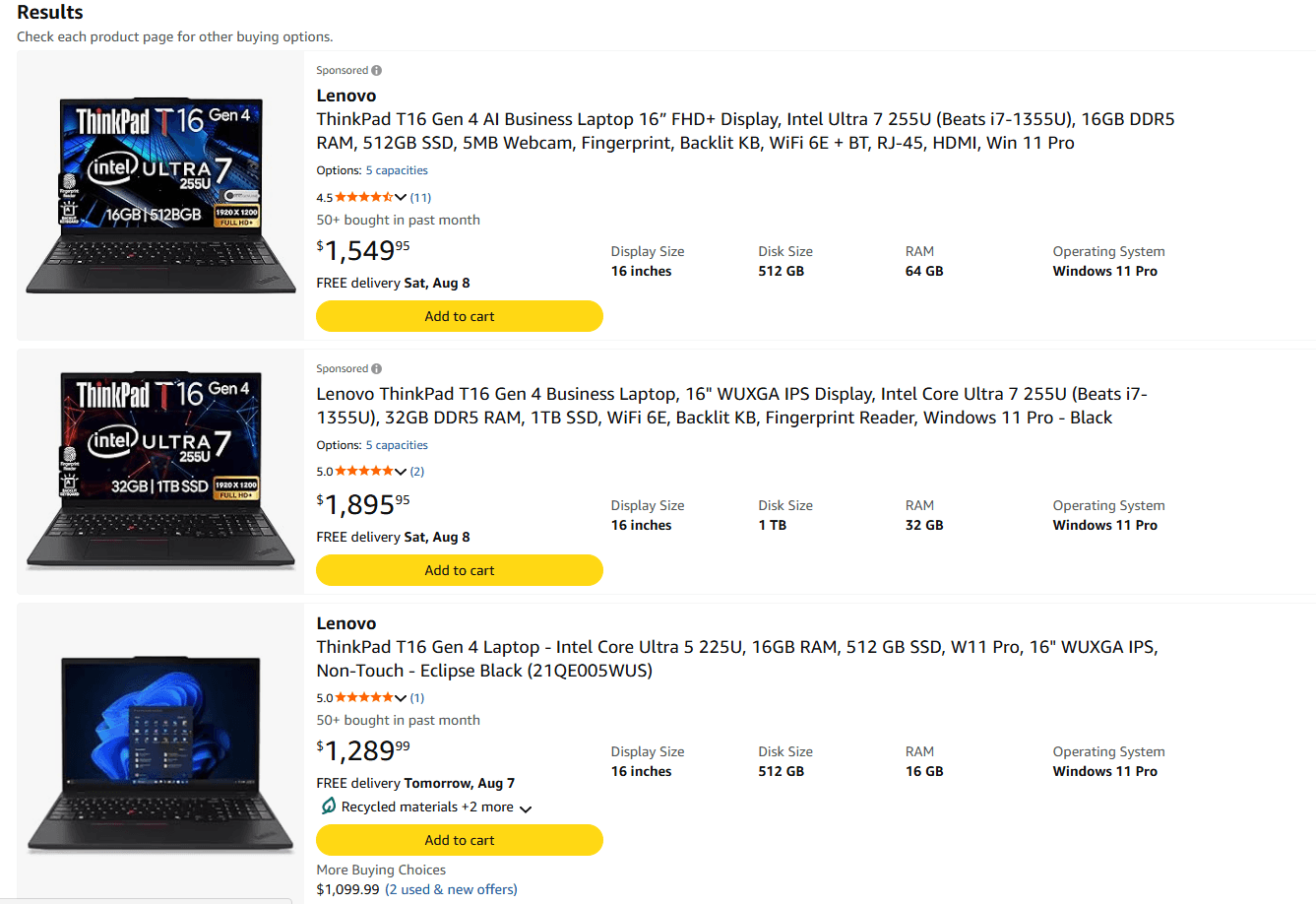
A Lenovo ThinkPad T16 search on Amazon, captured August 6, 2026.
Click into one of those listings and you may also see a prominent link that says "Visit the Lenovo Store." It is easy to read that as "this is being sold by Lenovo." That is not what it means. The seller information is listed separately on the page.
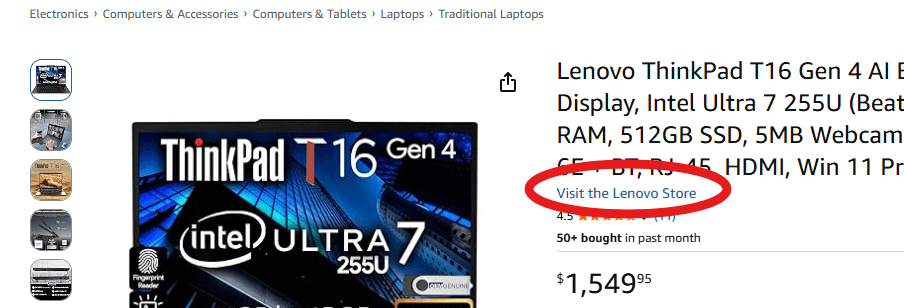
The brand-store link is prominent, but the actual seller must be checked separately.
In the listings we reviewed, both a sponsored result and a top non-sponsored result displayed Lenovo branding while the actual seller was neither Lenovo nor Amazon. That does not automatically make either listing bad. It simply means the due diligence starts there.
1. Check Who Is Actually Selling and Shipping the PC
Do not stop at the brand name, the product image, or the "Visit the Lenovo Store" link. Look for the "Sold by" and "Ships from" fields, then click into the seller profile.
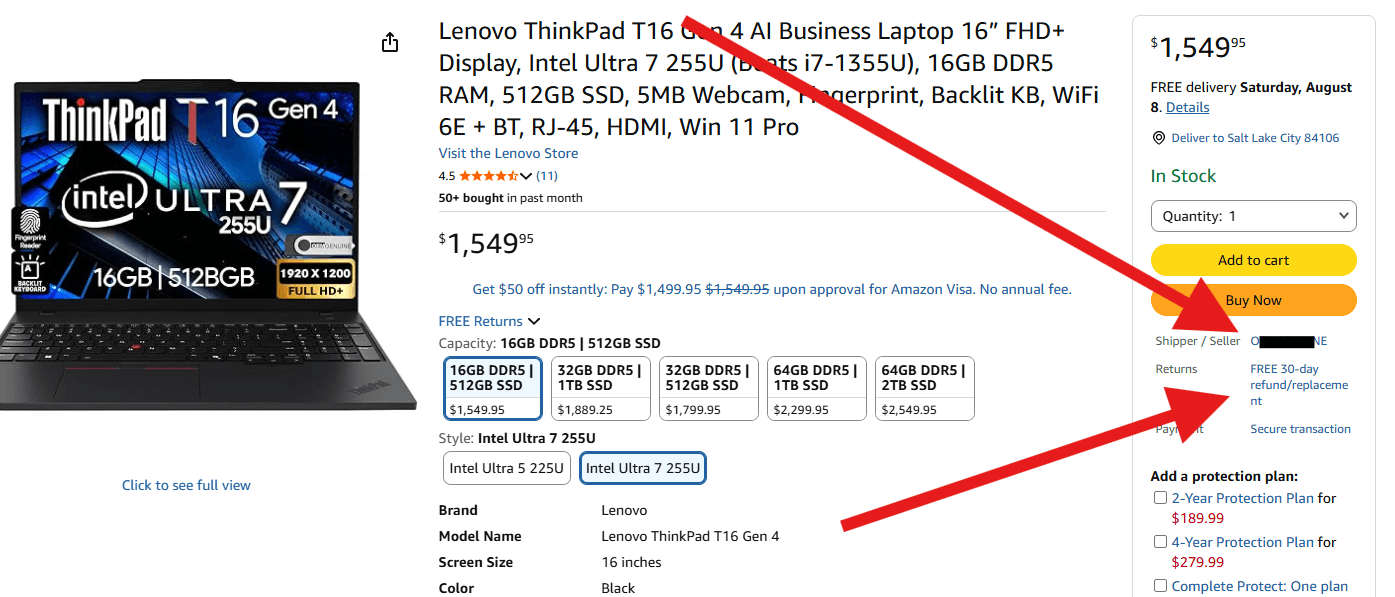
Example listing: the brand and seller are separate pieces of information.
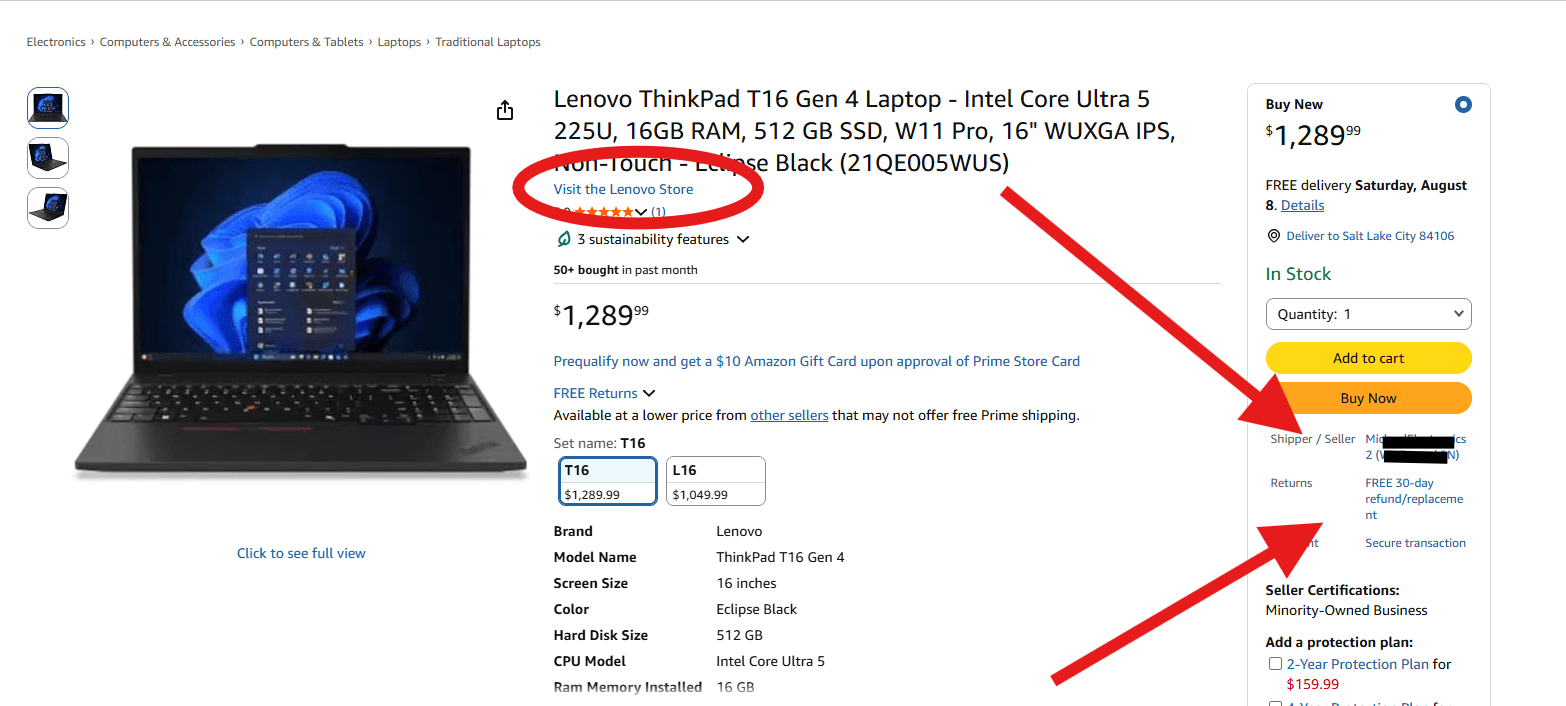
A second ThinkPad listing from the same search, again showing a third-party seller.
Seller ratings matter too. In one of the listings we reviewed, the seller showed a 79% positive rating over the previous 12 months. Personally, I would not put a business hardware purchase behind a rating like that. I generally want to see a seller above 95% before I even keep looking. That is my rule of thumb, not an industry standard, but business equipment is not where I like to gamble on fulfillment and support.

One seller in the search showed a 79% positive rating over the previous 12 months.
A strong seller rating does not prove that the seller is manufacturer-authorized, and it does not tell you whether the computer has been modified. It is simply one more signal to check.
2. Find the Manufacturer Part Number
A model name is not enough. A ThinkPad T16 can be sold in many factory configurations with different processors, memory, storage, displays, operating systems, and support entitlements.
The Lenovo manufacturer part number, sometimes referred to as the machine type/model or MTM, gives you a way to trace the original factory configuration and compare one listing to another on an apples-to-apples basis.
Several of the marketplace listings we reviewed did not provide a Lenovo manufacturer part number at all. That is a transparency problem. If a seller is advertising a 64 GB or 512 GB configuration but will not tell you the original Lenovo part number, you cannot easily tell whether that is how the machine left the factory or whether the configuration was changed later.
Once the device is in hand, Lenovo also provides an official warranty lookup tool that uses the machine serial number to confirm warranty status and entitlements.
3. Ask What Changed After the PC Left the Factory
A common marketplace model is to buy a lower-cost factory configuration, open the system, and replace the RAM or SSD before reselling it at a higher capacity.
There is nothing inherently wrong with upgrading a computer. Universal Systems does it too. The difference is whether the buyer knows exactly what changed, what parts were installed, and who is responsible for the complete system afterward.
In our repair center, we have removed third-party RAM and SSDs from marketplace systems that we would never specify for a business fleet. Sometimes the replacement part has more capacity than the factory component it replaced, but capacity alone does not tell you the quality, endurance, firmware support, or traceability of that component.
Before buying a modified business PC, I would want the seller to answer a few basic questions:
What was the original factory configuration?
Exactly what components were replaced or added?
What are the manufacturer and model numbers of the replacement RAM and SSD?
Are the replacement components new?
Who supports those components if they fail?
If the seller cannot answer those questions clearly, I would move on.
4. Understand the Warranty Before You Need It
This is where the distinction between an authorized reseller and a marketplace seller becomes especially important. Lenovo says its authorized resellers are verified by Lenovo and are committed to selling genuine products with proper warranty coverage.
Lenovo's current Limited Warranty also excludes failure or damage resulting from modification, and Lenovo support documentation lists replacement or use of non-Lenovo or non-warranted parts among services that are not covered.
That does not mean installing third-party memory automatically wipes out the warranty on the entire laptop. It does mean the non-Lenovo component itself may fall outside Lenovo coverage, and a failure caused by a modification may not be covered. The result can be two different support paths: Lenovo for the original Lenovo hardware and the marketplace seller for the upgraded component.
One of the listings in our search made that split visible in the fine print: a one-year Lenovo warranty alongside a separate one-year seller warranty. Plenty of buyers will never notice that distinction until something fails.

Example warranty language showing Lenovo coverage alongside a separate seller warranty.
When a machine is down, that is not when you want to start figuring out which company owns the ticket, whether labor is included, or how long a replacement part will take.
5. Know What Seller Verification Does, and Does Not, Tell You
There is a federal transparency framework for large marketplace sellers. Under the INFORM Consumers Act, online marketplaces must collect and verify identifying information from high-volume third-party sellers. The FTC generally defines that threshold as at least 200 transactions and $5,000 in gross revenue in a 12-month period. Sellers with at least $20,000 in annual gross revenue on a marketplace are also subject to additional disclosure requirements.
That is useful for accountability, but it is important to understand what it does not mean. Marketplace verification does not make a seller a Lenovo-authorized reseller. It does not validate the factory configuration, certify replacement components, or guarantee that Lenovo will support a third-party upgrade.
6. Treat Business PC Procurement Differently From Personal Shopping
If I am buying one personal laptop for myself, I may be willing to accept a little ambiguity for the right price. Business IT hardware procurement is different.
Once you are buying 20, 100, or 500 endpoints, small inconsistencies turn into operational problems. You want repeatable SKUs, known configurations, predictable warranty entitlement, asset records, replacement options, and one clear answer to the question: "Who do we call when this breaks?"
The purchase price matters, of course. It just is not the whole cost of the device. A few hundred dollars of savings can disappear quickly if your IT team has to chase a seller, reinstall a failed system, or sort out a warranty dispute.
A Quick Checklist Before Buying a Business Laptop Online
Before purchasing a business notebook, desktop, workstation, or server from an online marketplace, make sure you can answer all of these:
Who is actually selling the product?
Who is shipping it?
Is the seller manufacturer-authorized?
What is the exact manufacturer part number or MTM?
What was the original factory configuration?
Has any hardware been changed or added?
What warranty applies to the base system and to any upgraded components?
Who handles support, labor, returns, and replacement parts if something fails?
Can you verify the serial number and warranty entitlement immediately after delivery?
The Bottom Line
A recognizable website is not the same thing as a transparent purchase. Marketplace deals can absolutely be good deals, but business buyers should know who configured the machine, what they changed, and who is standing behind it.
To be clear, there are legitimate vendors that modify systems to meet a customer's requirements. Universal Systems is one of them. We document the original and final configuration, specify the components we are putting into a business system, and make the warranty and support responsibility clear before the machine is deployed.
Universal Systems has served customers since 1989. As a Lenovo partner and authorized Lenovo repair center, we help organizations verify business PC configurations, Lenovo warranty coverage, lifecycle expectations, and support options before money is spent.
If you are considering a marketplace listing and want a second opinion, send it our way before you place the order. We will tell you what we would check before we bought it ourselves.
Sources and Fact-Check Notes
Gartner, February 26, 2026 - Forecasts a 130% increase in combined DRAM and SSD prices by the end of 2026, a 17% increase in PC prices, and a 10.4% decline in PC shipments versus 2025.
Amazon Seller Statistics - Amazon states that more than 60% of sales in its store come from independent sellers.
Federal Trade Commission: INFORM Consumers Act - Explains seller verification and disclosure requirements for high-volume third-party marketplace sellers.
Lenovo Shopping FAQ - Lenovo describes the benefits of purchasing through authorized Lenovo resellers and separately excludes third-party marketplace pages from its price-match policy.
Lenovo Limited Warranty - Current Lenovo warranty language addressing failures or damage resulting from modification and warranty eligibility for Lenovo products and parts.
Lenovo Warranty Lookup - Official Lenovo tool for checking warranty status and entitlements by serial number.
← All insights

© 2026 Universal Systems, Inc. All rights reserved.